Recall
Loading…
Recall
668 books · Any PDF

Read anything.
Remember every word.

Recall is an AI-powered reading and language-learning app. Open a PDF — yours, or one of the 668 books in the built-in library — tap any word you don't know to get an instant flashcard written from that exact sentence, and memorise it with spaced repetition (SRS).

Free · Works offline · No credit card

Read it. Tap it. Remember it.
The Recall home screen: daily goal ring, words learned, streak and the books you are reading
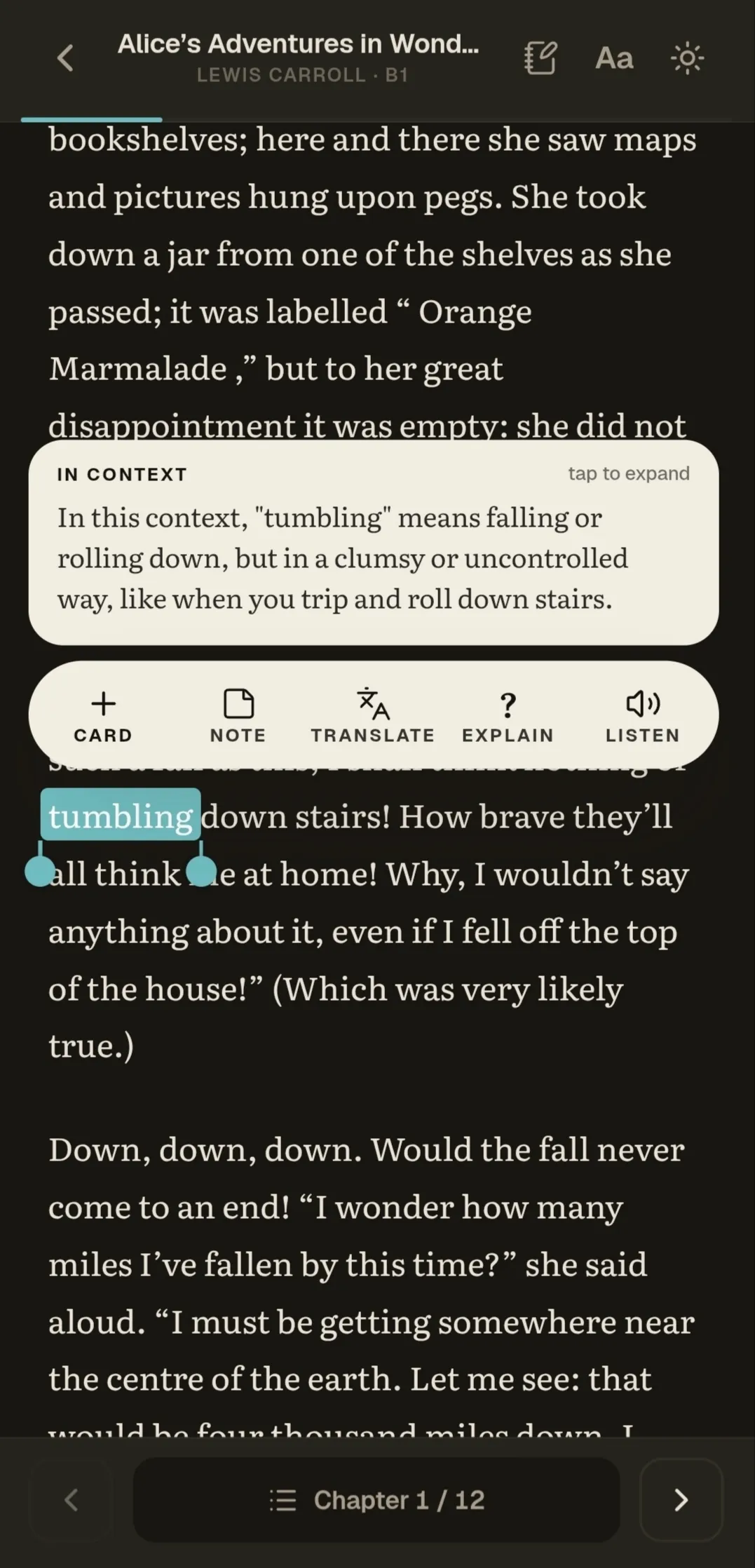
The reader open on a page of Frankenstein with a word selected and its Card / Translate / Listen menu showing
The gap

You are already reading enough.

Reading happens in one place — papers, PDFs, subtitles. Memorising happens in another: a deck full of words you have never met. Between the two, words vanish.

I write the card while you read.
Without Recall

Read Tuesday ➔ Look up word ➔ Forgotten by Thursday

Recall closes the gap
With Recall

Read page ➔ Tap word ➔ Card saved on page ➔ SRS remembers for you

Read. Mark. Remember.

How it works

Three steps, then it runs itself.

01 · Read

Bring your own page

Open a PDF, pick a book from the built-in library, or paste a YouTube link into Listening Lab. The file is parsed on your device — it is never uploaded.

02 · Mark

Tap a word you don’t know

Recall reads the sentence around it and writes the card: definition, part of speech, an example, and the page it came from. One tap takes you back there.

03 · Remember

Show up for a few minutes

The card joins your queue and the scheduler decides when it returns. No streak pressure, no badges — when the queue is clear, you are done for the day.

Page assistant

Ask questions about the page.

Stuck on a dense paragraph? The assistant already has the page you are on — no copying, no pasting, no second tab.

  • Summarise the page, or unpack one hard sentence.
  • Translate a phrase without leaving the reader.
  • Have the page read aloud while you follow along.
Stuck on a page? Ask me.
The reader's chat tab open over a PDF page, with suggested questions about that page
Ask anything
Summarise · Explain · Translate
Read aloud
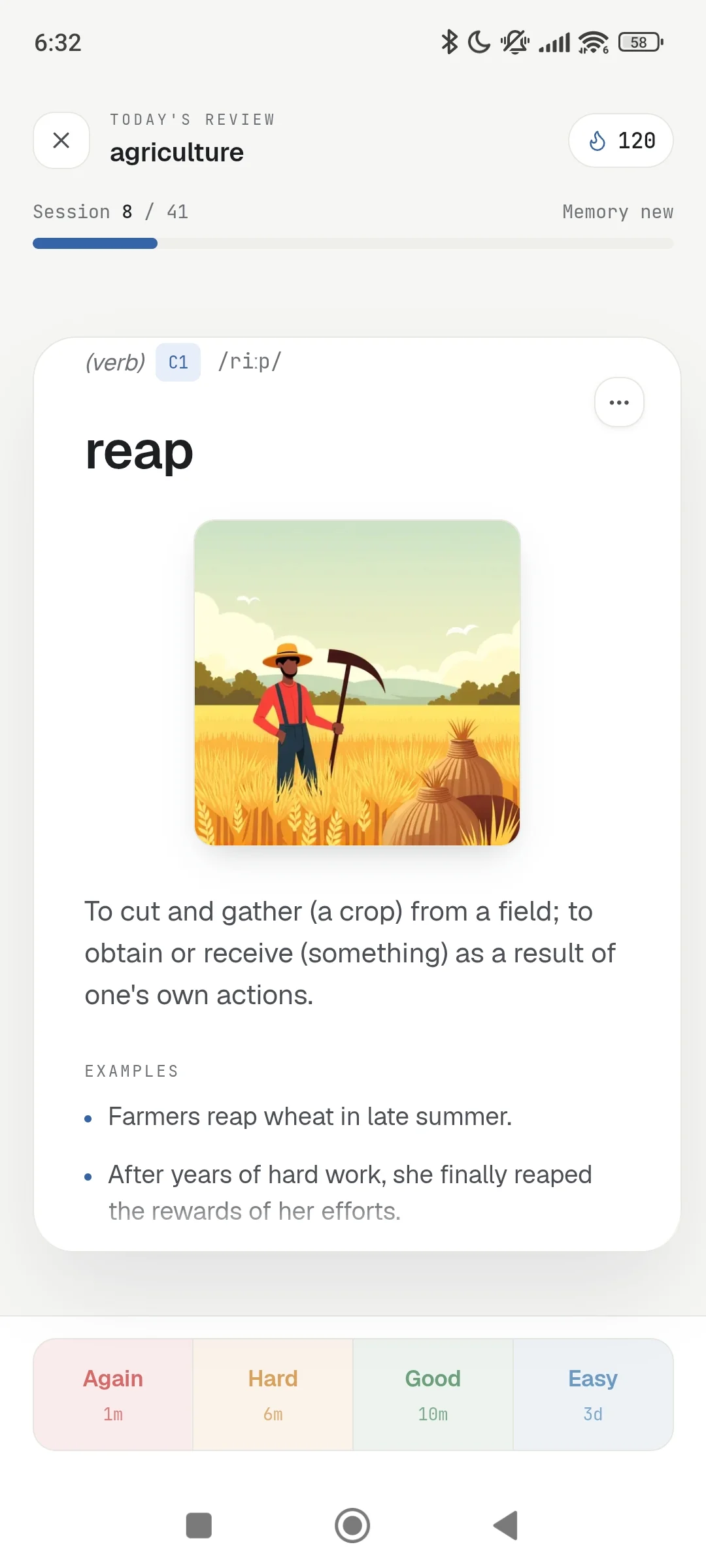
The review screen showing a flashcard with four rating buttons
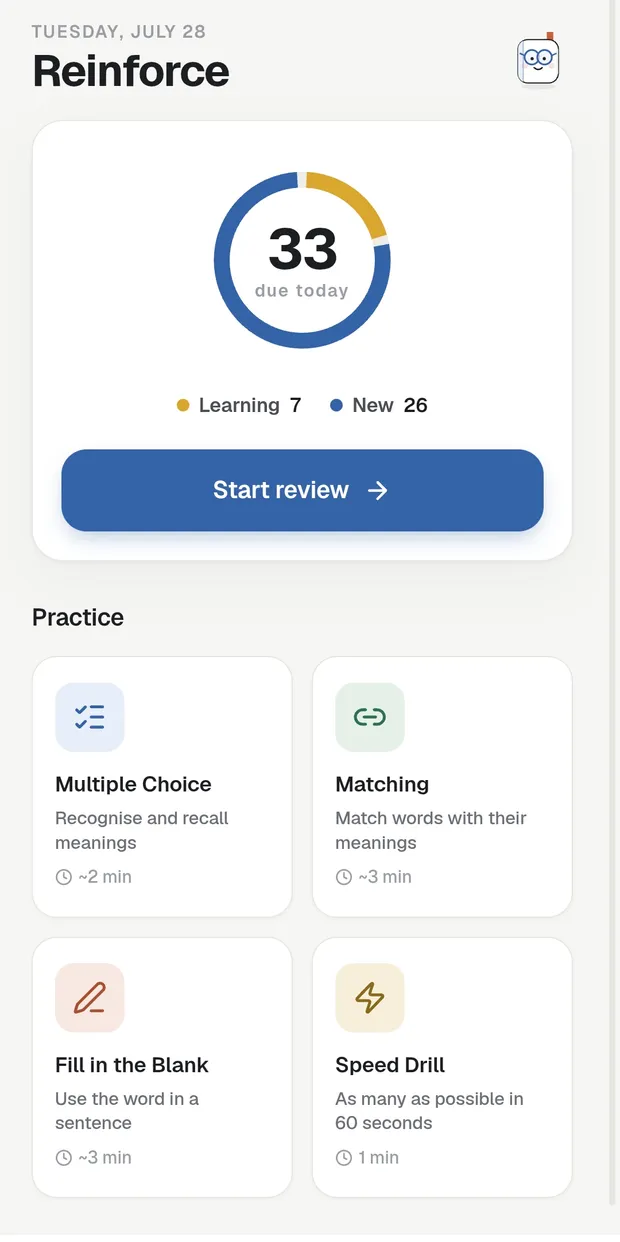
The Reinforce hub listing the multiple choice, matching, fill-in-the-blank and speed drills
Practice

Turn memory into instinct.

The review queue asks “do you know this word?”. The drills ask the same thing four other ways, so recognising a word turns into being able to use it.

  • Multiple choice — recognise it among near misses.
  • Matching — pair words with meanings against the clock.
  • Fill in the blank — put it back in its own sentence.
  • Speed round — answer before you can think.
Two minutes. Let's go.
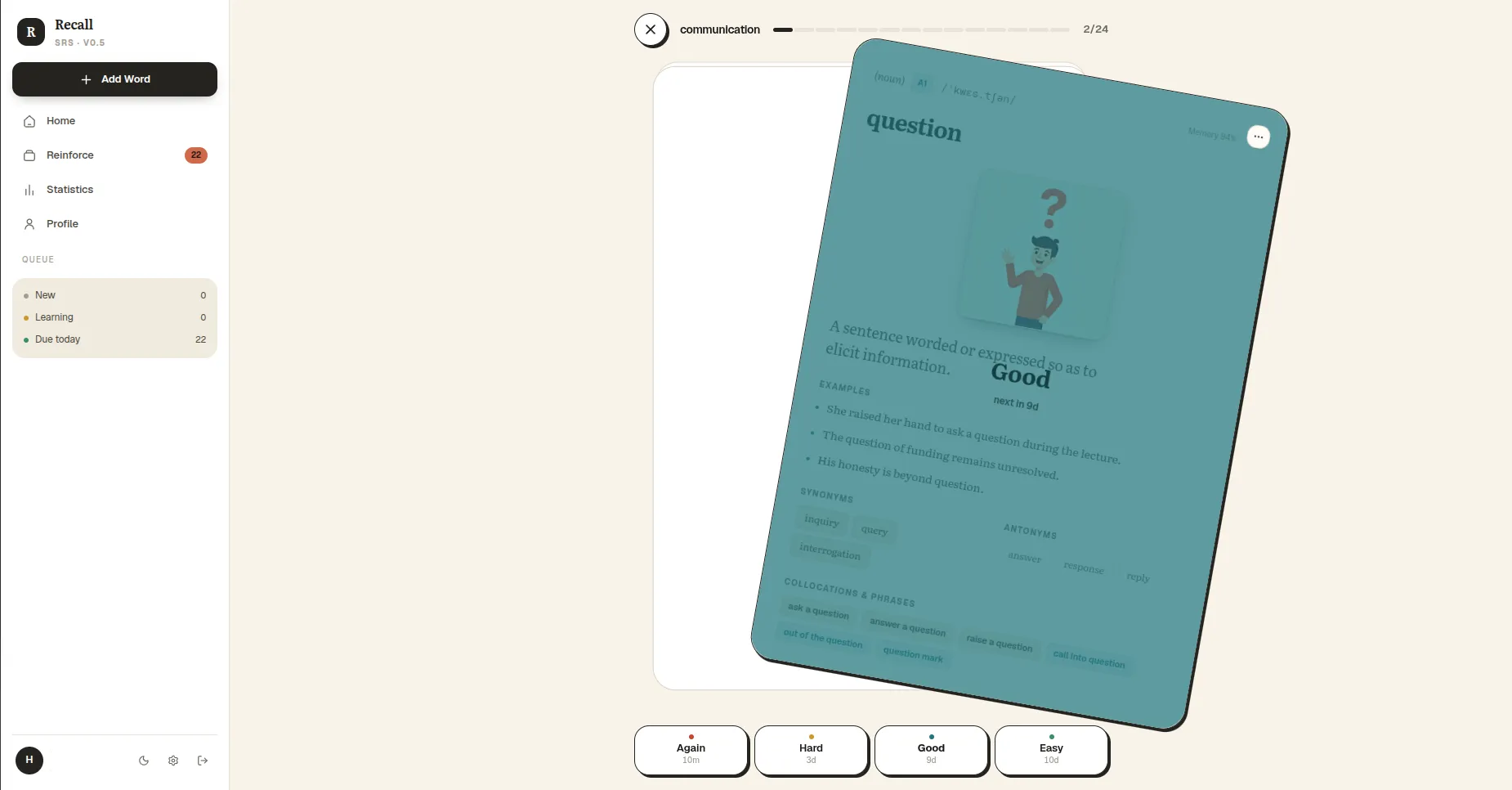
Recall in a desktop browser: the sidebar queue on the left and a flashcard being rated Good in the review view
Built-in library

668 books, if you haven’t brought one.

Classic novels, short fiction and graded non-fiction — most of them narrated, with the transcript beside the audio. Every word you tap works exactly as it does in your own documents.

  • 668 titles, 578 of them narrated.
  • Filter by level, theme, length or audiobook.
  • Picks up where you left off, on any device.
Pick one at your level.
The Discover screen: 668 titles with search and level filters, and a continue-reading card
578 narrated
Audio + full transcript
And the rest of the loop

Four more ways in — one queue.

Every surface feeds the same deck and the same review queue. Nothing you collect ends up in a separate app.

A real PDF reader

Continuous scroll, pinch zoom, highlighter and pen, sticky notes, bookmarks — and a jump straight back to the page any card came from.

Listening Lab

Paste a YouTube link and the transcript loads beside the video. Click a word and the card remembers which video, and which line, it came from.

Add any word

A word you ran into with no page attached? Type it, pick a deck, and the definition, the examples and a visual cue are written for you.

Progress you can read

An activity heat map, retention, card strength and a forecast of what falls due next — computed on your device, offline, from your own review history.

The scheduler

It decides when. You just show up.

Recall runs an SM-2 spaced-repetition scheduler — the same family Anki users already trust. Each answer moves the card’s ease factor between 1.3 and 2.5, stretching or shortening the next gap. Weak words come back often; strong ones drift out of the way.

Four buttons. I handle the timing.
One word · seven answersNext interval
1 mAgain
10 mHard
1 dGood
3 dGood
8 dGood
21 dEasy
2 moMastered
Privacy, plainly

Your documents stay yours.

The file never leaves

PDFs are opened and parsed on your own device. Only the single word you tapped and the sentence around it are sent — and only to write the card.

Nothing is watching

No ads, no advertising identifiers, no third-party analytics. The privacy policy names which AI provider processes which piece of text, and why.

Leave with everything

Export every card you have made, or delete your account and every row of its data, from inside the app — no email, no waiting.

Questions

Before you start.

Is it free?
Yes — Recall is free to use, with no credit card and no ads. Sign in with Google or an email address and start reading.
Do I need my own PDFs?
No. The built-in library carries 668 books, 578 of them narrated — and Add Word turns any word you ran into somewhere else into a full card.
Does it work offline?
Yes. Your decks, review queue and statistics live on the device and sync as soon as you are back online. Generating a new card needs a connection; reviewing does not.
I already use Anki. Why switch?
Same scheduling family, none of the card writing. Recall generates the card from the sentence you met the word in — and one tap on that card returns you to the page it came from.
Which platforms?
Any modern browser, on a laptop or a phone. The Android app and the Chrome / Edge extension are on the way.
Get Recall

Start in the browser.

The web app is the whole product — it installs nothing and works offline once loaded. The Android build and the browser extension follow.

Web

Laptop or phone browser

Android

A real app, not a wrapperComing to Google Play

Chrome & Edge

Right-click, add the cardExtension in review

Start with the book you already have open.

Free to use, offline-friendly, and everything you make stays exportable.